
Quick summary: AI logo generators are fast and cheap, but the savings rarely last. Many AI-generated logos are raster files that break down in print, come with no brand system, and may be harder to protect under trademark and copyright law. Here’s why we recommend a designer-built vector logo, and where AI still helps.
The Hidden Cost of a “Free” AI Logo
AI logo generators promise what founders want most early on: speed and a low price. Type a few words, get a handful of logo options in under a minute, and download one for little or nothing. When you’re juggling licensing, inventory, and a launch date, that can feel like a gift.
The catch is that the savings are mostly an illusion. The cost doesn’t go away. It moves downstream and grows, showing up at the print shop, in a trademark filing, or when a vendor tells you they can’t use the file. In this post, we’ll walk through why we don’t recommend AI-generated logos, what that choice can cost you later, and where AI still has a useful role.
A logo that’s cheap to make can be expensive to live with.
Key Takeaways
- Many AI tools produce raster images that blur when you scale them, and auto-tracing them creates messy files that printers struggle to use.
- An AI logo has no strategy behind it. A prompt can’t capture your positioning, audience, or competitors.
- U.S. courts don’t recognize copyright in works without a human author, so a purely AI-generated logo relies on trademark protection alone.
- The real costs show up later: rebuilt files, inconsistent branding, scaling failures, and legal problems at the worst possible time.
- AI works well for mood boards and early concepts, but a production-ready logo and brand system still need a designer.
What’s Actually Happening When AI “Creates” a Logo
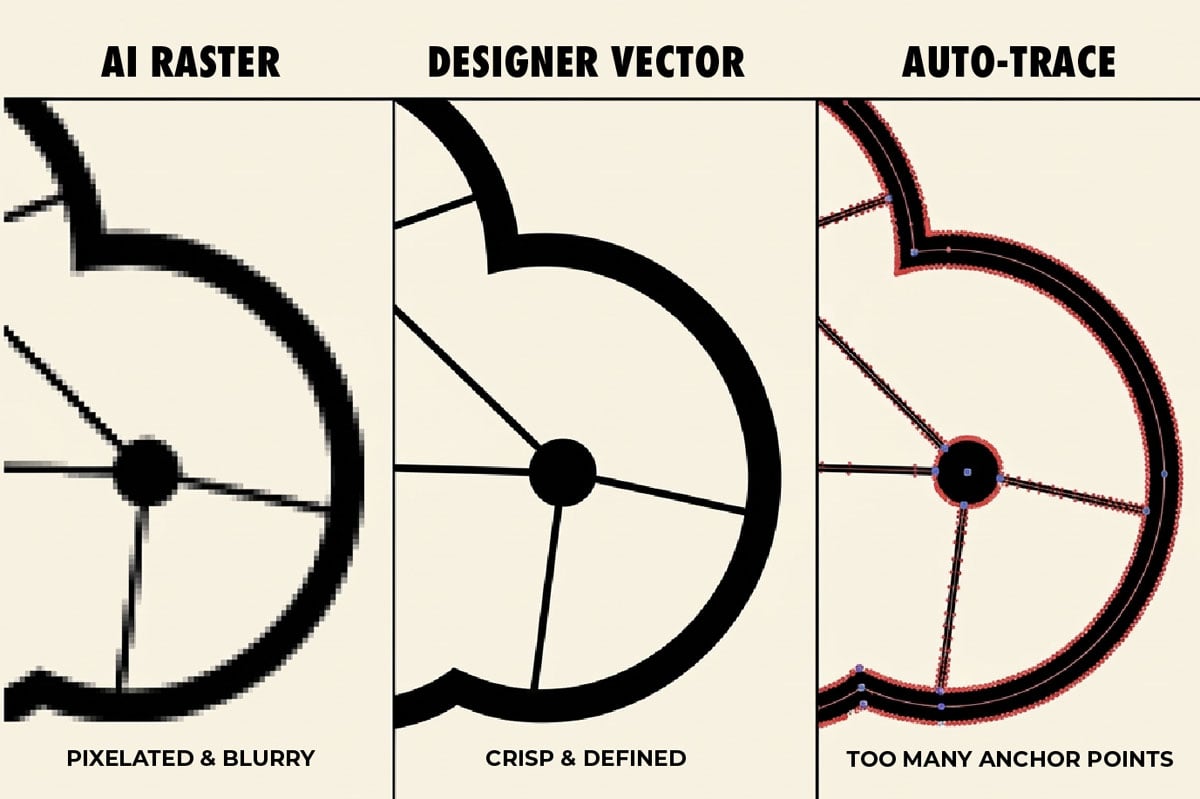
The first problem is the file itself. Raster images are built from a grid of pixels, so they blur or break up when enlarged. Vector images are built from mathematical paths, so they stay sharp at any size, whether it’s for a business card or a storefront sign. Many popular AI image generators produce raster images, and a raster logo can look fine on a screen but cause trouble once you need to print, embroider, or scale it.
To work around that, many people run the AI image through auto-tracing software, which converts pixels into paths. The result is usually messy: bloated paths, stray points, wobbly curves, and shapes that technically scale but are hard to edit. Printers and other designers often find these files frustrating to work with.
Some newer AI tools skip that step and export vector files directly. That solves the pixel problem, not the construction problem: the paths are still generated rather than drawn, and they often carry the same excess points and uneven curves.
A designer builds a vector logo in Illustrator the opposite way. Every point is intentional and kept to a minimum, the geometry is clean, and the file is easy to adjust, simplify, and reproduce.
A professional logo is designed with purpose. An AI logo is an approximation of a picture.
The Core Problems With AI-Generated Logos
Cleaner files are only part of the story. These are the issues we see most often:
- Inconsistency. The same prompt can give you a different result every time. That makes it hard to ask for “the same logo, but horizontal” or to revise a single element without starting over.
- No strategic foundation. A prompt isn’t a brief. There’s no positioning, audience, or competitor research behind the mark, so it can’t reflect who the brand is or how it wants to stand out.
- Originality and legal risk. These tools learn from huge collections of existing images, so outputs can resemble marks that already exist. Terms of service also vary on who owns what the tool produces, so it’s worth reading them closely.
- Trademark weakness. U.S. courts haven’t recognized copyright in works that lack a human author. That matters because a human-designed logo can be protected by both copyright and trademark, while a purely AI-generated one generally has to rely on trademark alone. You can still register an AI-generated logo as a trademark if it’s distinctive and doesn’t conflict with existing marks, but unclear origins can complicate that process.
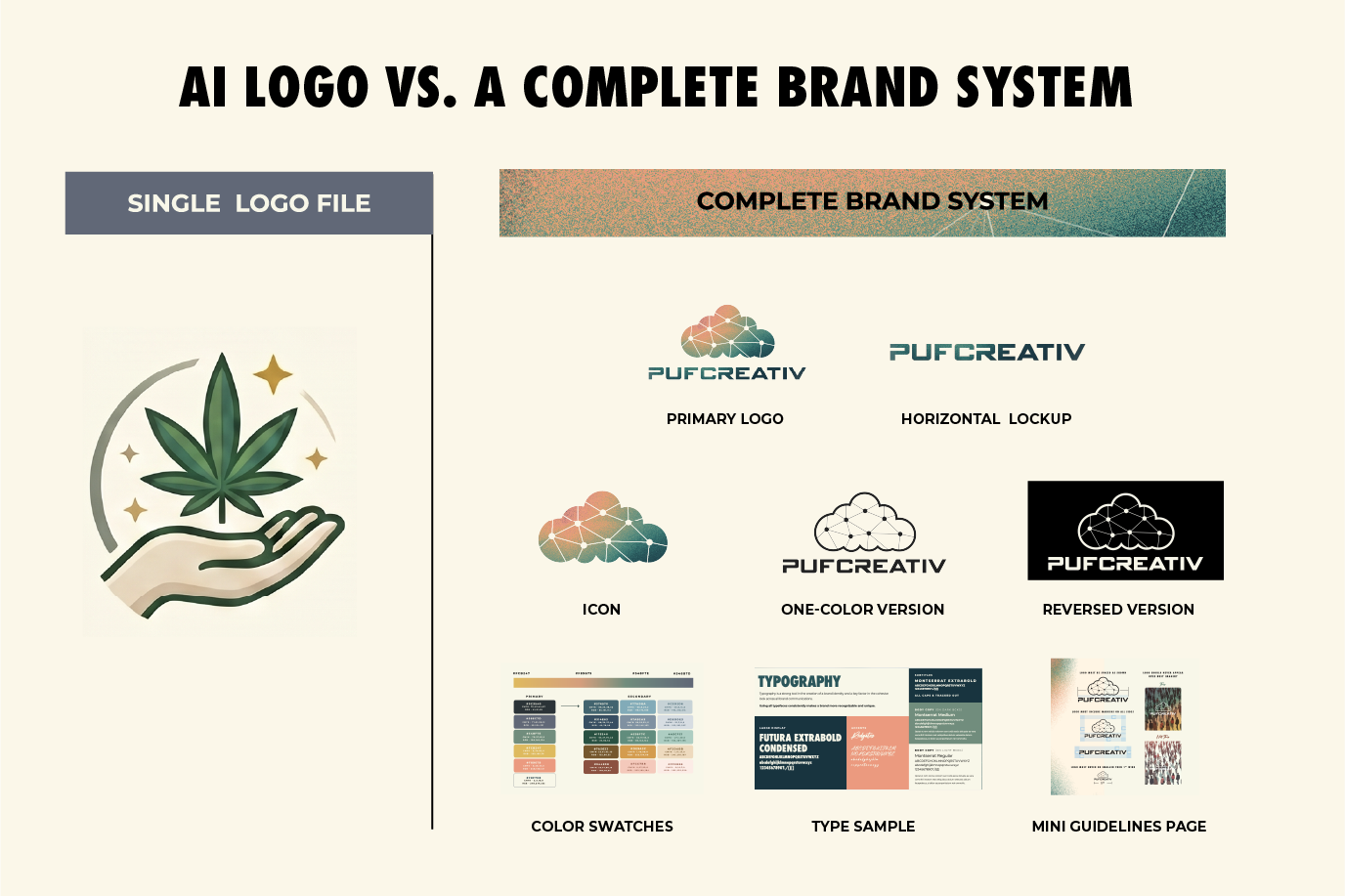
- No system. You get one image, not a toolkit. There’s no horizontal version for your website, no single-color version for merchandise, and no guide to help your team use the logo consistently.
Each of these looks small on its own. Together, they leave a brand without a firm foundation.
Where AI Logo Problems Show Up Later
The real cost of an AI-generated logo rarely appears on day one. It tends to arrive in pieces:
- Production breakdowns. Printers and embroiderers often can’t use the file as delivered, so the client ends up paying twice: once for the AI logo, and again to have it rebuilt.
- Inconsistent appearance. Without clear files and rules, the mark drifts as different vendors recreate it across packaging, signage, and social media.
- Scaling failures. Fine detail collapses at small sizes, and the logo may not reduce cleanly to one color for stamping, engraving, or stitching.
- Legal exposure at the worst time. Similarity or ownership problems rarely surface when you create the logo. They surface when the stakes are highest: midway through a trademark filing, or after launch in the form of a cease-and-desist letter.
- Harder to defend against copycats. If a competitor copies your mark, murky origins can weaken your position. Without copyright to fall back on, and with a trademark that may be thinner than you assumed, pushing back on a lookalike gets harder and more expensive.
- A hidden tax. Every future designer, printer, and agency has to rebuild or work around the file, and that time shows up on every invoice.
The first invoice is rarely the last.
AI Is for Exploration, Not the Final Logo
We’re not against AI. It can be a helpful starting point for mood boards, visual inspiration, and rough concept exploration. A designer might use it to test a direction quickly or to give a client something to react to.
The line is the deliverable. Early exploration is a good fit for AI, but the final, production-ready brand asset isn’t. Our answer is “yes, and”: yes, use AI to explore, and then bring in a designer to turn the best ideas into something that works everywhere your brand appears.
Use AI to start the conversation, and use a designer to finish it.
What a Full Branding System Includes
A logo gives your brand a symbol. A full branding system connects that symbol to a larger story and carries that meaning into every context where your brand appears.
A complete package typically includes:
- A primary logo in multiple formats, including vector and high-resolution raster files for print and digital use.
- Secondary and alternate logo lockups (arrangements), such as horizontal, stacked, and icon-only versions for different placements.
- Monochrome and reversed versions for applications such as engraving, embroidery, and single-color printing.
- A color palette with exact HEX, RGB, CMYK, and Pantone values for digital and print applications, helping maintain consistency across screens and materials.
- Typography guidelines that keep text consistent across every point of contact.
- Clear space and minimum size rules that protect the logo’s visibility and legibility and prevent misuse.
- A do’s and don’ts guide so future vendors and team members use the logo correctly.
- A brand guidelines document that ties everything together as a practical reference.
A logo answers “What does the mark look like?” A system answers “How does this brand function consistently everywhere it appears?”
What a Professional Logo Design Process Looks Like
A designed logo follows a path that catches problems early:
- Brief and discovery. We learn about your audience, positioning, and competitors.
- Concept exploration. We develop and test several directions against the brief.
- Refinement. We polish the strongest concept and test it at different sizes and in different colors.
- Vector production. We build the final mark with clean, intentional geometry.
- Brand system delivery. You receive the full set of files, guidelines, and alternate versions listed above: logo files in every format, alternate lockups, one-color versions, color values, typography, usage rules, and a brand guidelines document.
By the end of the logo design process, you should have files your printer can use, rules your team can follow, and a mark you can defend.
AI-Generated Logo FAQs
Can I use an AI-generated logo for my business?
Yes, but it often causes problems later. Many AI tools create raster files that printers and embroiderers can’t use as delivered. The logo also arrives without alternate versions, a color palette, or usage guidelines. Many businesses end up paying a designer to rebuild it.
Can I trademark an AI-generated logo?
You can register an AI-generated logo as a trademark if it’s distinctive and doesn’t conflict with existing marks. However, unclear origins can complicate the filing. U.S. courts also haven’t recognized copyright in works without a human author, so you’d rely on trademark protection alone. Consult a qualified attorney before you file.
Why do printers have trouble with AI logos?
Most AI image generators create raster files made of pixels, and those files blur when you enlarge them. Auto-tracing software converts the pixels into vector paths, but it leaves bloated, uneven geometry behind. Printers and embroiderers need clean vector files to reproduce a logo accurately.
Is AI useful in logo design at all?
Yes. AI helps with mood boards, visual inspiration, and rough concept exploration. Designers sometimes use an AI logo generator to test directions quickly or give clients something to react to. We just don’t recommend it for the final, production-ready logo.
What does a full branding system include?
A complete system includes a primary logo in vector and high-resolution formats, alternate lockups, monochrome and reversed versions, and a color palette with HEX, RGB, CMYK, and Pantone values. It also covers typography guidelines, clear space and minimum size rules, a do’s and don’ts guide, and a brand guidelines document.
I already have an AI logo. What should I do?
Have a designer review your files. They can check whether the logo is print-ready, rebuild it as clean vector artwork, and create the alternate versions and guidelines your brand needs. Reach out to the PufCreativ team to talk through your options.
Before You Commit to an AI Logo
The “free” AI logo isn’t really free. It’s a deferred cost that tends to show up later, usually when a project is already underway and changes are harder to make.
If you’re considering an AI-generated logo, or you’re already living with one and wondering how to move forward, we’re happy to talk through your options before you decide.
Reach out to the PufCreativ team to talk about a logo and brand system built to last.
Follow PufCreativ on LinkedIn | Instagram | Facebook | X
DISCLAIMER: The contents of this blog are intended for informational purposes only and do not constitute legal advice. Always consult a qualified attorney before making decisions about trademarks, copyright, or intellectual property.
